 QR Code Scanner
To scan a barcode on iPhone, open a barcode scanner app, point the rear camera at the barcode so the whole row of bars is in the frame, and hold steady for a second. The app reads the UPC, EAN or ISBN number and looks up the product. The built-in Camera app is designed for QR codes, not product barcodes, so a scanner app is the dependable way to do it.
If you have pointed your iPhone camera at the stripes on a cereal box and nothing happened, your phone isn't broken. Apple's own iPhone User Guide describes the Camera app and the Scan Code control in Control Center as tools for QR codes — the square, pixelated codes. Product barcodes are a different format, and reading them reliably takes a scanner app or a visual search tool. Below are three ways that work, from the fastest to the no-download fallback.
What is the difference between a barcode and a QR code?
A barcode (a 1D code) is a single row of vertical bars that stores a short number — usually a product's identification number. A QR code (a 2D code) is a square grid that can hold a whole web address, a Wi-Fi password or contact details. Your iPhone's camera is tuned to spot QR codes and turn them into a tappable link; a barcode contains only a number, so it is only useful when an app looks that number up in a product database.
How do you scan a barcode with a scanner app?
A dedicated scanner reads every common retail barcode and tells you what the product actually is. With the free QR Code Scanner * Barcode Reader app (every feature is free to use up to a usage limit; an optional Premium in-app purchase removes the limits):
- Install and open the app. The scanner opens straight away — no account to create and no ads to dismiss.
- Point the rear camera at the barcode. Fit the whole set of bars inside the frame, roughly 10–20 cm (4–8 in) away. The same scan screen reads UPC, EAN and ISBN barcodes as well as QR codes.
- Hold steady for a second. In a dim aisle or pantry, tap the flashlight button on the scan screen.
- Read the result. With an internet connection, the app identifies the product and can show prices from several retailers, the Nutri-Score and NOVA rating of a food item, or a risk rating for cosmetic ingredients.
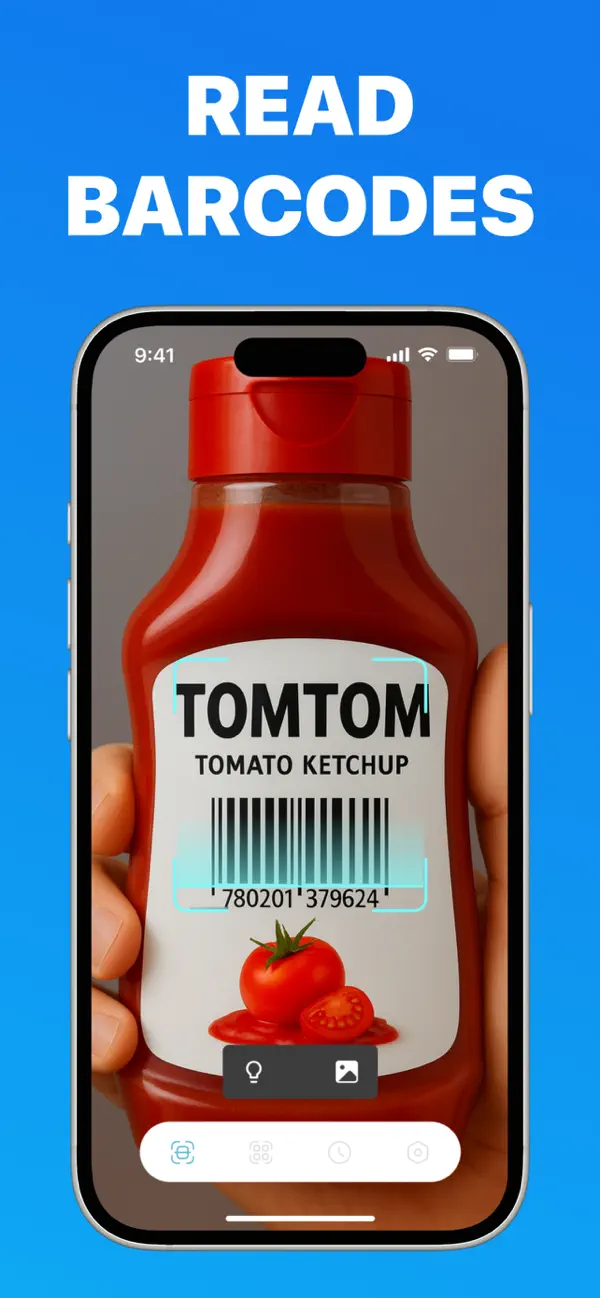
The same app works on iPad and on Apple silicon Macs, and the scanning itself works offline. Product details, prices and scores come from online databases, so those need a connection. Prices in particular are never read from the stripes: a product barcode doesn't contain the price, only the number the store and the app look it up by.
Can Google Lens scan a barcode on iPhone?
If you already have the free Google app, its Lens camera can recognize product barcodes and run a web search for the item.
- Open the Google app and tap the Lens (camera) icon in the search bar.
- Point the camera at the barcode and let Lens recognize it.
- Browse the search results for the product, shops and reviews.
Lens is a general visual search tool rather than a dedicated scanner: it always needs an internet connection, and you get web search results rather than a structured product page. Lens can also read a barcode in a saved photo or screenshot; see how to scan a barcode from a picture.
How do you look up a barcode without an app?
Every retail barcode has its number printed in plain digits underneath the bars. When the barcode is torn, wrinkled or too faded to scan, this is the fallback that always works:
- Read the 12 or 13 digits printed below the bars (8 on very small packages).
- Type them into Safari's search bar or into a retailer's app search.
- Open the result that matches the product name and size on the packaging.
It's slower than scanning, but it is a good way to double-check a scan that brings up the wrong item.
What about the built-in Camera and Control Center?
Apple's iPhone User Guide describes two built-in ways to scan codes: point the Camera app at the code in Photo mode, or open Control Center and tap the Scan Code control. Both are documented for QR codes. Some people report that the Camera occasionally reacts to a product barcode, but it isn't a documented feature, and even when it happens you don't get product details, prices or ingredients. If the Camera does nothing with a barcode, that's expected — use one of the methods above. (For QR codes, see how to scan a QR code on iPhone.)
Which barcodes can you scan?
| Barcode | Digits | Where you see it |
|---|---|---|
| UPC-A | 12 | Retail products in the US and Canada |
| EAN-13 | 13 | Retail products in Europe and most of the world |
| EAN-8 | 8 | Small packages with little room for a label |
| ISBN | 13 | Books — an EAN-13 that starts with 978 or 979 |
| QR code | — | Links, menus, tickets, Wi-Fi (a 2D code, not a barcode) |
Shipping labels, warehouse shelves and ID cards often use other formats, such as Code 128 or PDF417. Support for those varies from app to app, so check the app's description if you need them for work.
What should you do when a barcode won't scan?
- Back off a little. Holding the phone too close is the most common problem. Start around 15 cm (6 in) away and let the camera focus.
- Fit the whole barcode in. Both ends of the bars must be visible; turn the phone sideways for long barcodes.
- Kill the glare. Shiny wrappers and cans reflect light across the bars. Tilt the phone slightly or move away from overhead lights.
- Add light. Turn on the flashlight in a dim room — but if it causes glare on glossy packaging, turn it off again.
- Flatten it. On bags and pouches, pull the packaging taut so the bars are straight.
- Product not found? The scan worked, but the item isn't in the database yet — common with store brands, local products and very new items. Type the number into a search engine instead.
Scan any barcode on your iPhone
UPC, EAN, ISBN and QR codes in one free app — with prices, food scores and ingredient checks. No ads, no sign-up.
Frequently asked questions
How do I scan a barcode on my iPhone?
Open a barcode scanner app, point the rear camera at the barcode so the whole row of bars fits in the frame, and hold steady for a second. The app reads the number and, if you are online, looks up the product. The built-in Camera app is designed for QR codes, so a dedicated app is the reliable way to read UPC, EAN and ISBN barcodes.
Can the iPhone camera scan barcodes without an app?
Apple documents the Camera app and the Scan Code control in Control Center for QR codes only. They are not designed to read product barcodes like UPC or EAN and do not show product details, so if nothing happens when you point the Camera at a barcode, use a scanner app or type the digits printed under the bars into a search engine.
How do I scan a barcode with my iPhone to find the price?
Use a scanner app with price comparison. Scan the product barcode and the app matches the item and lists prices from several retailers. In QR Code Scanner * Barcode Reader, a scan shows prices from Amazon, eBay, Best Buy, Target, Farfetch and StockX. Price lookups need an internet connection.
Do I need internet to scan a barcode on iPhone?
Reading the barcode number happens on the iPhone, so scanning itself works offline. Looking up what the product is, its price or its ingredients needs a connection, because that information comes from online databases.
Does the barcode number tell me where a product was made?
No. According to GS1, the organization that issues barcode numbers, the first digits of a barcode show which national GS1 office issued the company's number, not the country where the product was manufactured. Check the label for the country of origin instead.